"The Messy Voter List Problem: Why Your Election Often Goes Wrong Before Voting Even Starts"
Voting opened at 8:00 on Monday morning. By 8:20 the secretary had three emails. One member had received two ballots. Another, who had paid dues for eleven years, had received none. A third was writing on behalf of her husband, who shares her email address and wanted to know where his was.
Nothing was wrong with the ballot. The candidates were right, the dates were right, the count hadn't even begun. The election had gone wrong a week earlier, when someone exported the membership spreadsheet and assumed it was a voter list.
A member list is not a voter list
The membership spreadsheet was built for other jobs: collecting dues, mailing the newsletter, printing the directory. It has been edited by a succession of volunteers, each with their own habits. It is usually good enough for a newsletter, because nobody disputes a newsletter.
An election asks more of it. Every row becomes a claim: this person is entitled to vote, exactly once, and can be reached at this address. A list that is 95% right for mailing purposes is, for voting purposes, a list with a few dozen problems waiting to be discovered — in public, on the first morning.
The six ways lists go wrong
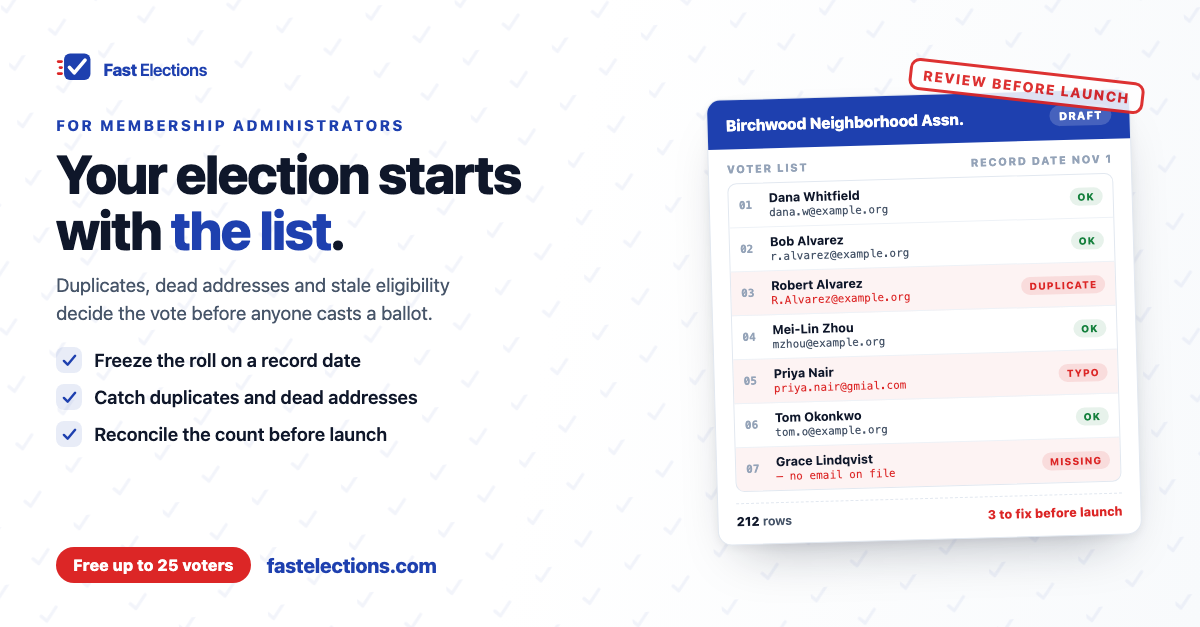
1. Duplicates. The same person appears twice: once under a work address and once under a personal one, or as "Bob Alvarez" and "Robert Alvarez." Left alone, that is one member with two ballots.
2. Dead and mistyped addresses. People change jobs, abandon old accounts, and get typed in as "gmial.com." Their invitation bounces or vanishes, and from their side it looks like they were left out.
3. Shared addresses. Couples and households often share one inbox. If each of them is entitled to a vote, one address can't carry two ballots — and if only one of them is entitled, you need to know which.
4. Eligibility that changed. Lapsed dues, a unit that sold in March, a student who graduated, an associate member who never had voting rights. The spreadsheet still lists them all, because nothing forced anyone to remove them.
5. The wrong unit of voting. Some organizations vote one per person, some one per household or per unit, some by shares or percentage interest. A list of people is the wrong list for a one-vote-per-household election, and the reverse is just as true.
6. Stale groups and districts. If only one chapter votes for its own representative, a member filed under last year's chapter gets the wrong questions.
Why it hurts more than it seems
Each of these is small. Together they do disproportionate damage, for three reasons.
First, a missing ballot is the most personal election failure there is. The member doesn't experience it as a data problem. They experience it as being excluded.
Second, a duplicate ballot is the most damaging. Even one — even unused — is proof that voting twice was possible, and that is enough for a losing side to question the result.
Third, bad addresses quietly lower turnout. Twenty undelivered invitations out of two hundred is a tenth of your electorate gone before anyone has made a choice, which matters a great deal if you have a quorum to meet.
And every one of these is cheap to fix a week before voting opens and expensive to fix a day after.
The better approach: freeze, clean, review
Treat the voter list as its own document with its own deadline, not as a by-product of the membership database.
Pick a record date and take a snapshot. Clean the snapshot, not the live spreadsheet. Have a second person look at it. Then have the board or election committee accept it, in writing, as the roll for this election. When a member later asks why they did or didn't get a ballot, the answer is a rule and a date rather than a shrug.
A voter-list checklist worth saving
- Write down who is eligible. Membership class, dues status, and the record date — taken from your bylaws, not from memory.
- Decide the unit of voting. Per person, per household, per unit, or weighted. Build the list in that unit.
- Export a snapshot on the record date and work only from that copy.
- Remove everyone who isn't eligible, and keep a note of why for each group you removed.
- Hunt duplicates by name, not just by email. Sort by last name and by street address; software can catch a repeated address, but only a person can tell that Bob and Robert are the same member.
- Resolve shared addresses. Each voter needs an address of their own. Call or write to the households that share one before voting opens.
- Fix the obvious typos. Scan for misspelled domains, missing "@" signs, and stray spaces.
- Chase the addresses you already know are bad. If the last newsletter bounced, the ballot will too.
- Check groups and weights against the current source — this year's chapter roster, the current ownership schedule.
- Reconcile the count. The number of voters on the list should equal a number you can explain: 212 members in good standing, 212 rows.
- Get a second pair of eyes, then have the committee approve the final list.
- Plan for corrections. Decide who members contact if they get no ballot, and who has authority to add or correct a voter once voting is under way.
Where Fast Elections fits
No software knows who your members are, and Fast Elections doesn't pretend to. Deciding eligibility is still your job. What it does is make the mechanical problems visible before launch instead of after.
You paste the list, or import a CSV or Excel file, and it's checked line by line: a repeated or invalid email is called out by line number, so you fix those rows rather than redo the list. Emails are de-duplicated without regard to capitalization, and the saved voter count sits above the list so you can reconcile it against your own number. Group tags and voting weights come in as columns from the same spreadsheet.
Every voter gets one unique, single-use link — one address, one ballot. If the election is scheduled for a future start, the roster stays fully editable until just before it opens. Once voting is running you can still add a missed member, and on the paid tiers an invitation that bounces is flagged on that voter, so you can correct the address and send a fresh link; the old link stops working when the new one is issued. If you'd rather members come to you, an optional registration page lets them request a ballot, with manual approval if you want to check each one against the roll.
It won't catch Bob and Robert. That part of the checklist is still yours.
If you have an election coming up, you can build it in Fast Elections for free — up to 25 voters, no credit card — load your list, see what gets flagged, and see exactly what your voters will experience before paying anything: fastelections.com