Online Voting vs. Survey Tools: Why Your Election Shouldn't Be a Google Form
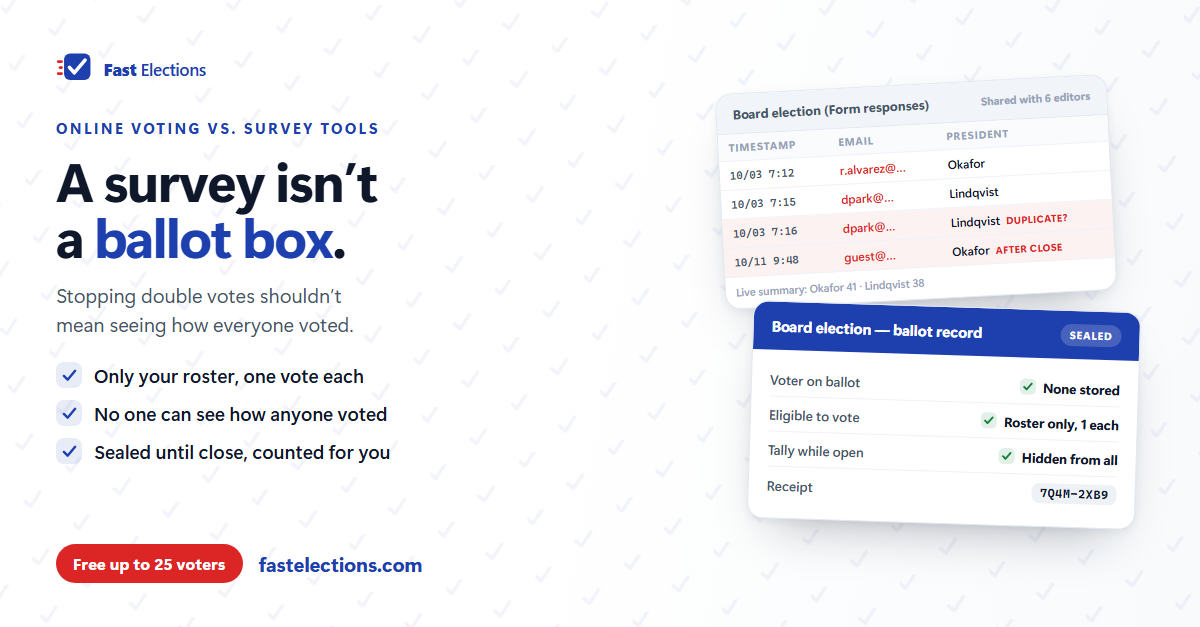
It usually starts in a board meeting. The election is three weeks out, nobody wants to print ballots, and someone says, "Can't we just do a Google Form?"
It's a reasonable suggestion. The tool is free, everyone already has it, and you can build a ballot in twenty minutes. For a lot of decisions it works fine. For an election, the problems don't show up while you're building the form. They show up afterward — when the result is close, someone is unhappy with it, and the board is asked to explain how the vote was run.
A survey and an election answer different questions
A survey asks: what do the people who responded think? Anyone with the link can answer, the results are a summary of whoever showed up, and a few duplicate or stray responses don't change the conclusion much.
An election asks something narrower and harder: what did the eligible members decide — each voting once, in secret, before the deadline — and can we show that? Every part of that sentence is a requirement a survey tool wasn't designed to meet.
Where the survey approach breaks
1. Anyone with the link can vote. A form link is a door, not a list. It gets forwarded to a spouse, pasted into a group chat, shared by a member who "just wanted to help." Unless the tool checks each response against your roster, you have no idea whether every ballot came from someone entitled to cast one.
2. "One per person" means identifying the person. Survey tools stop duplicates by requiring respondents to sign in with an account, or by collecting an email address with each response. Either way, the answer is now tied to a name. Skip that step and you're back on the honor system — and a determined member can vote as many times as they have browsers.
3. Fixing duplicates breaks the secret ballot. This is the trap. The setting that stops double voting is the same setting that lets the form's owner see how each member voted. "We won't look" is a promise, not a secret ballot — and it's a hard promise to keep when everyone on the board can open the response sheet.
4. The tally is visible while people are still voting. Most form tools show a live chart of responses to anyone who can edit the form. In a small organization, a board member watching the tally tick up moments after a neighbor says "I just voted" has learned that neighbor's vote. Visible partial results also change behavior: they rally one side and demoralize the other.
5. Counting is left to you. A plurality question is easy. A multi-seat board race, a ranked-choice vote, or a motion where abstentions shouldn't count toward the majority all end up in a spreadsheet, counted by a volunteer, with formulas nobody else has checked. Ranked choice in particular — eliminating the last-place candidate and redistributing ballots round by round — is exactly the kind of work you don't want done by hand at 10 p.m.
6. The deadline is soft, and the record is thin. Responses that arrive after the close, a row someone edited, a response deleted as a "duplicate" — the spreadsheet doesn't distinguish. When a member asks, "How do we know this is right?", the honest answer is "because we trust the person who ran the form."
When a survey tool is the right tool
None of this makes forms bad. Use them for what they're for: picking a date for the picnic, gathering feedback on a proposal, a non-binding straw poll, a sign-up sheet. If the outcome isn't binding and nobody would contest it, a form is fine.
The line is roughly this: if the result elects someone, spends money, changes the bylaws, or could be challenged, it's an election — and it deserves a tool built for one.
Eight questions to ask of any voting tool
Worth running through before your next vote, whatever you use:
- Can only people on our member roster vote, even if a link gets forwarded?
- Is each eligible member limited to one ballot — without an account or password?
- With full access to the tool, could anyone see how a specific member voted?
- Are partial results hidden from everyone, organizers included, until voting closes?
- Does voting actually stop at the deadline, automatically?
- Does the tool count our question types correctly — multi-seat, ranked choice, motions with abstentions — and show its work?
- Can a voter confirm their own ballot was counted without revealing their choices?
- Afterward, do we have a record of who was eligible and who participated that we could show a member who questions the result?
A survey tool typically gets one or two of these. An election system should get all eight.
If you're using a form this year anyway
Sometimes the timeline wins. If a form is what you have, reduce the damage: write down the eligibility rule and the roster before the link goes out; decide in advance how duplicates and late responses will be handled, and put it in the announcement; limit edit access to the form and the response sheet to one or two people; and have a second person check the count before it's announced. It won't give you a secret ballot, but it will give you an answer when someone asks how the vote was run.
Where Fast Elections fits
Fast Elections was built to answer those eight questions with "yes." You paste in your member list, and each voter gets their own unique, single-use voting link — no account, no password, and a forwarded link can only ever cast one member's one ballot. Cast ballots carry no reference to the voter who submitted them, so nobody can connect a vote to a person — including us.
While the election runs, you see turnout, not the tally. It closes itself at the end time you set, and results are calculated automatically for plurality, multi-seat, approval, ranked-choice (with every round shown), and yes/no/abstain motions — ties are reported plainly for your bylaws to settle, never decided by coin flip. Every voter gets a receipt code, and when you publish results the list of codes is published with them, so members can confirm their ballot was counted. You keep an exportable roster of who voted; nobody keeps a record of how.
If you have an election coming up, you can build it in Fast Elections for free and see exactly what your voters will experience before paying anything — elections up to 25 voters are free, with no credit card: fastelections.com