How to Run a PTA or PTO Election Online Without Creating Accounts for Every Parent
Questo articolo è disponibile solo in inglese.
It's April, and the PTA needs to elect next year's officers. The bylaws say the election happens at a general membership meeting. Eleven people come. Four of them are the outgoing board, two are candidates, and one is there for the pizza. The slate passes on a voice vote, and the new president spends the next year being asked who, exactly, elected her.
Everyone on the board knows the fix is to let members vote from home. Everyone also knows what happens when you ask 300 families to create an account on a tool they'll use once a year: a handful do, most don't, and the volunteer who set it up spends the week resetting passwords. Parents already juggle the district portal, the lunch account, the classroom app, and the sports sign-up. A login for the PTA election is where they draw the line.
Here's how to run the election online without one.
The real problem isn't the voting. It's the list.
Software vendors talk about ballots. Parent groups argue about rosters.
In a PTA, voting rights come with membership: the people who paid dues this year, as of whatever cutoff your bylaws name. In a PTO the rules vary, but there's always a definition somewhere. Either way, the electorate is a specific list of people, and that list is not the school directory. The school's family list includes every household, member or not, and it was collected for school business under privacy rules that don't extend to a volunteer election. Build the voter list from your own membership records.
Then get the unit right. Membership is usually per person, not per household. If two parents in one house both joined, they're both voters and each needs their own ballot sent to their own address. If one joined, one votes. Shared family emails are the most common way a PTA election ends up with a disputed count, so ask for an individual address at the membership table in September and you won't be untangling it in April.
Accounts are the wrong tool for identity
A login proves that someone knows a password. That's not what an election needs. What the election needs to know is that this ballot went to a member on the list, that only that member could use it, and that it was used once.
A unique, single-use voting link does exactly that, and nothing more. Each member gets a link that belongs to them alone, delivered to the address on the membership roll. Open it, mark the ballot, submit. After that, the link is dead: nobody can vote twice, and a forwarded link is useless after the first use. There's nothing to sign up for and nothing to forget. Identity rides on the roster, the same way it does when you mail a ballot to a home address.
For the members whose email you never collected, a registration page works the same way in reverse. Post a link or a QR code in the newsletter and on the bulletin board, let members register with their name and email, and approve each one against the membership list before a ballot goes out. That is the one place a human check belongs: on the way onto the roster, not at the ballot.
A checklist for the PTA or PTO election
Save this for the board meeting where the question comes up.
- Read the bylaws first. Check whether they require the election to happen at a meeting, what notice is required, and whether electronic voting is allowed. PTA units should also check their state PTA's rules. If the answer is unclear, ask before you commit to a method, not after.
- Set an eligibility cutoff date and pull the voter list from membership records as of that date. Not the school directory.
- One entry per member. Two members in a household means two emails. Fix shared addresses before the election, not during it.
- Decide what happens with the slate. If the nominating committee's slate is uncontested, decide whether members vote yes or no on each officer or on the slate as a whole. If your bylaws allow nominations from the floor, decide how a write-in works online.
- Set a voting window with a hard close, usually five to ten days, ending before the meeting where results are announced.
- Offer the ballot in the languages your families speak. If the school sends notices home in Spanish and Vietnamese, the ballot should go out that way too.
- Plan the reminders. Most ballots arrive on the first day and the last. A reminder the day before close catches the people who meant to vote and forgot.
- Decide how results are announced and who keeps the record for the minutes. Publish the count, not just the winners.
Where Fast Elections fits
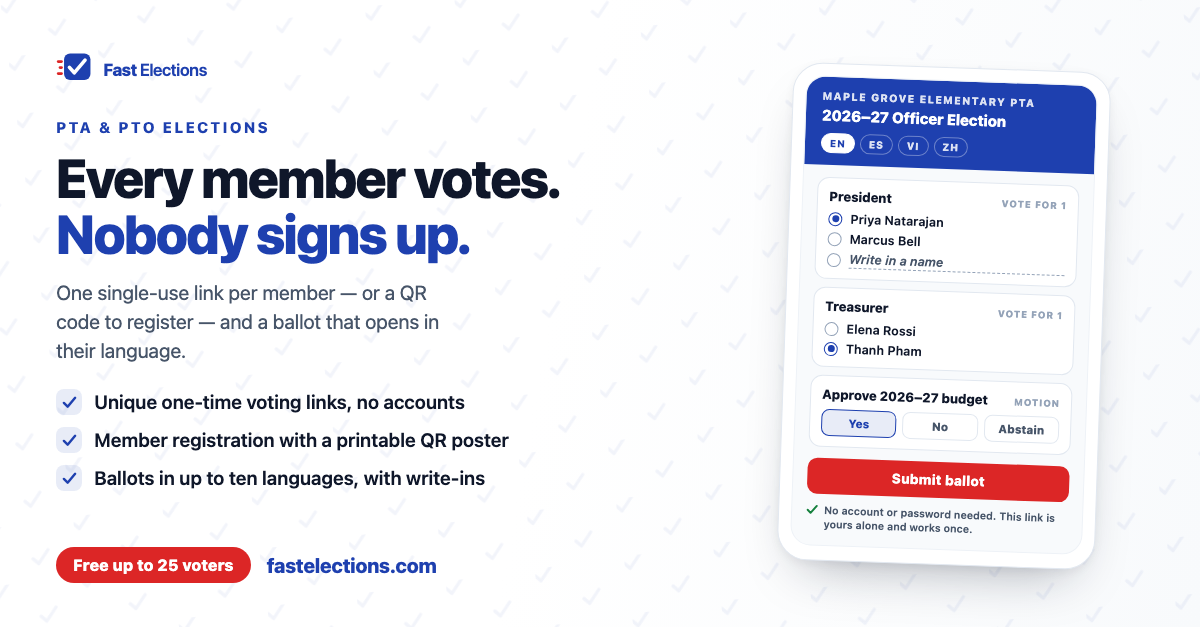
Fast Elections was built around that model. Voters never create an account or set a password. You paste your membership list in, one member per line, duplicate emails are caught automatically, and each member gets their own single-use voting link.
If you don't have everyone's email, turn on voter registration. You get a public registration page, a shareable link, and a printable QR poster for the bulletin board. Set it to manual approval and each registration waits until you've checked it against the membership roll. Registration closes at least 24 hours before voting ends, so late approvals still have time to vote.
Ballots can mix officer races, with write-ins allowed on vote-for-one and approval questions, and yes/no/abstain motions for the budget or a bylaws change. You can offer the ballot in up to ten languages, including Spanish, Vietnamese, Chinese, Tagalog, and Portuguese, typing the translations yourself or using the optional AI translation add-on for $5. Each voter's ballot opens in their browser's language.
Set the open and close times and the election runs itself. On paid tiers, invitations go out automatically and non-voters are reminded 24 hours before close, and 72 hours before on longer elections. During voting you see who has voted, never how. When it closes, publish results to a link any parent can open, alongside each voter's receipt code so they can confirm their own ballot was counted.
Pricing is per election, not a subscription: $19 for up to 300 voters, $49 for up to 1,000. Elections up to 25 voters are free with no credit card, which covers a board or committee vote; on the free tier you share each voter's link yourself instead of us emailing it.
If your officer election is coming up, build it in Fast Elections for free and see exactly what your members will experience before paying anything: fastelections.com